Product Import Export Plugin for WooCommerce
Trusted by professionals, freelance developers, and WooCommerce store owners for their product import export needs.
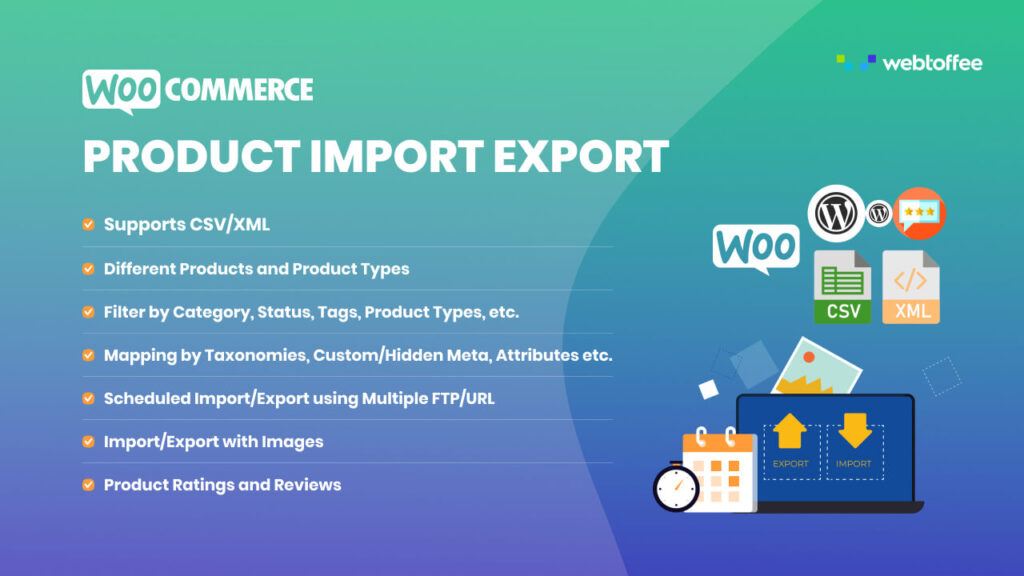
The Top-Rated CSV/XML Product Import Export Suite
Used by over 70,000 users with most 5 star ratings on WordPress.org
Testimonials
202 customer ratings
Here is Nick Kensington from Australia, who has been our customer since 2018 explaining how Product Import Export for WooCommerce plugin made his job easy.
Nick Kensington
Director of Phancybox Digital Agency
For those who make frequent changes, this plugin is almost a must. You can’t edit dozens of products regularly without a similar plugin. Personally, I really enjoy the ability to import from Google Sheets, which works correctly and allows me.

Top notch plugin and tech support! The time saved importing thousands of product field inputs is invaluable to any eCommerce site and the Product Import Export Plugin For WooCommerce is just the tool for the job. Mark was very prompt to workout.
As one man in marketing working with several online resellers of our products, this has made my job so much easier in terms of maintaining a web catalog and product database for internal use. The customization is a big plus.
Easy to Use and Affordable Plugin that Saves Your Time
Join over 100,000 store owners who use our import/export tools to ease their day to day tasks.
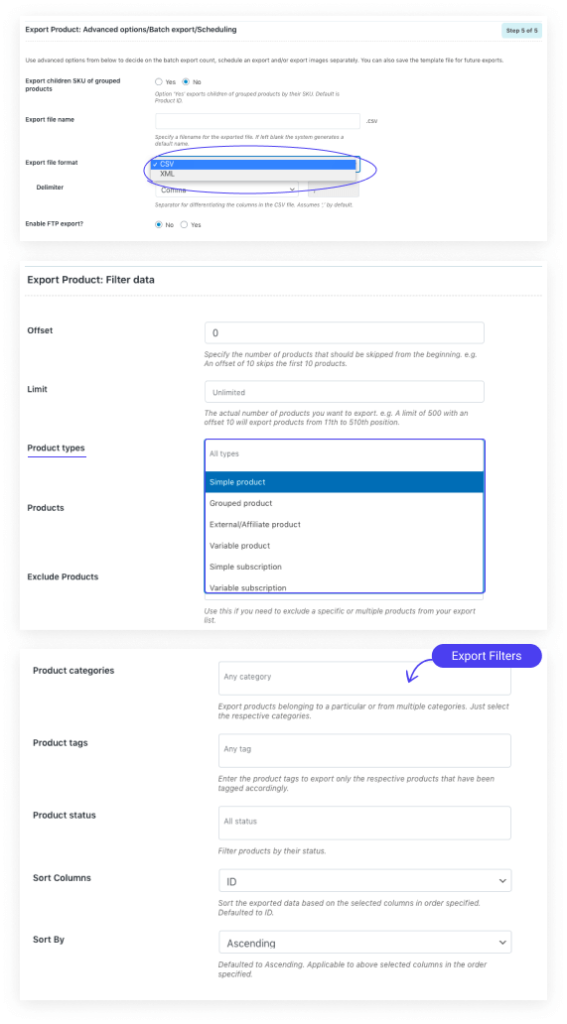
Export WooCommerce Products
Supports CSV/XML File Format
Export and download product data of different WooCommerce product types in CSV/XML file format.
Facilitates Scheduled Export using FTP/URL
The plugin helps to schedule WooCommerce product export using multiple FTP/URL profiles.
Supports All Product Types
Export and download different product types.
The plugin also supports custom WooCommerce product types other than the WooCommerce standard ones.
Several Filtering/Sorting Provisions
You can facilitate custom product export using several filter/sort options:
Custom Export Mapping/Column Order
Provisions are given to map or drag the columns accordingly to reorder them within the output file.
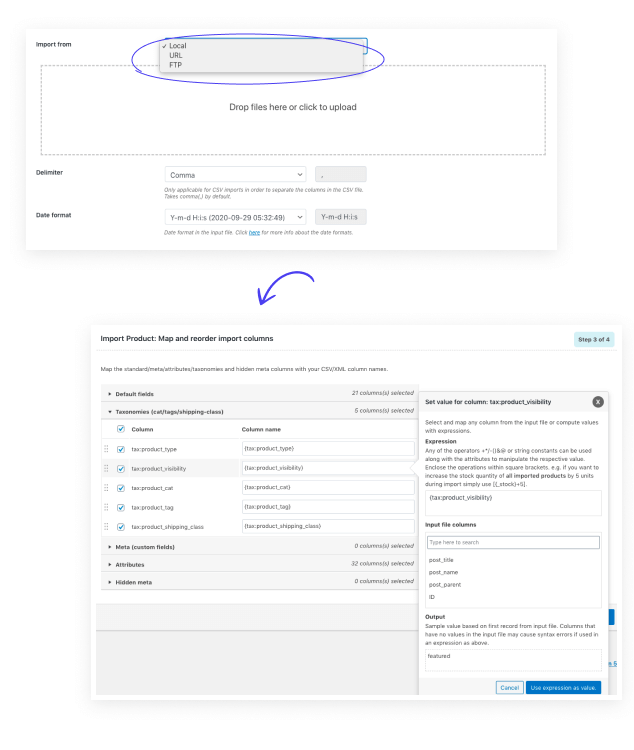
Import WooCommerce Products
Supports All WooCommerce Product Types:
Plugins supports import of all types of products including,
Import via Multiple Methods:
You can import the products from a CSV/XML file via different methods
Map Product Columns Easily: The columns of your file may not correspond with the WooCommerce products data fields always. You can map fields using the simple interface and then save the mapping settings for later imports.
Import Product Variations: Easily import all variable products and it’s properties from the file.
Scheduled Import using Cron Job: Schedule to import products at regular intervals from a remote server. You can set rules to skip certain products from updating.
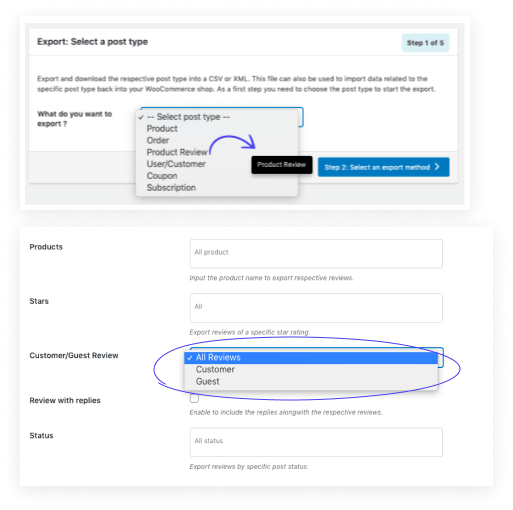
Export/Import Product Reviews
Export Product Reviews: You can export product reviews based on ratings, stars, customer/guest reviews, status, products etc.
Import Product Reviews: Easily import Product ratings from another store via a file. During import, you can edit the ratings, author name, date, verified tag, and content of the reviews.
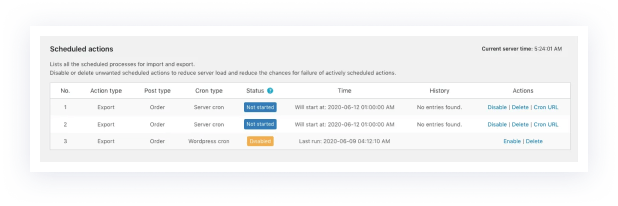
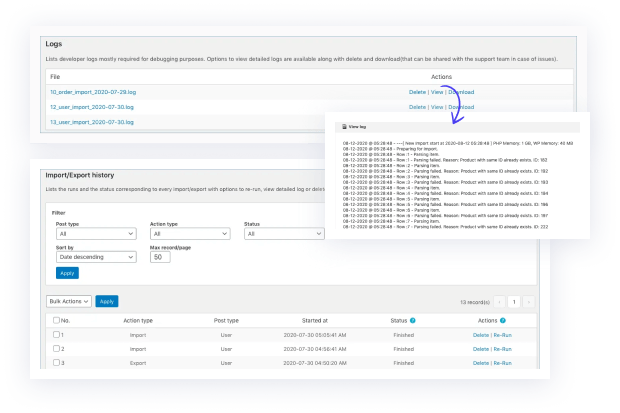
Scheduled Actions, Debug Logs, and Detailed History
Scheduled Actions: Lists all the scheduled processes for import and export. You can disable or delete unwanted scheduled actions to reduce server load and reduce the chances for the failure of actively scheduled actions.
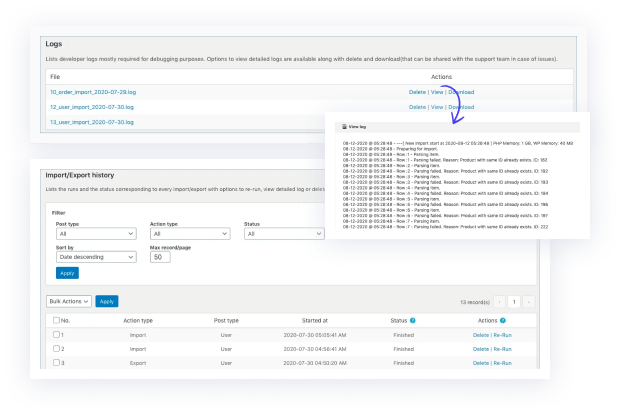
Debug Logs: Lists developer logs mostly required for debugging purposes. Options to view detailed logs are available along with delete and download (that can be shared with the support team in case of issues).
History: Lists the runs and the status corresponding to every import/export with options to re-run, view a detailed log or delete an entry. Re-run action will take the user to the respective screen depending on the corresponding action type and the user can initiate the process accordingly.
Multiple Import and Export Methods
Options to choose a convenient import and export method
You can import and export the data using three different methods.
Quick import/export: Import/Export all the data related to the export in one go without using any import/export options provided by the plugin.
Pre-saved Template: Use a pre-saved template for the import/export without having to configure the previous settings again.
New import/export: Do a fresh import/export with all new configurations.
Furthermore, you can choose the location of the CSV file for the import:
- Using CSV on your local computer
- Using the URL where the CSV can be fetched
- Using the FTP location of the CSV file

Scheduled Import/Export using Cron Job
Ensure regular batch import and export of data
You can auto-import the users at regular intervals from CSV which is present on FTP/SFTP Server by providing starting time and intervals between import. You can also auto export the data to FTP/SFTP in a CSV file at regular intervals.
You can create and manage multiple FTP profiles for use either on a one-time import/export or for a scheduled process.
Bulk Modification of Data
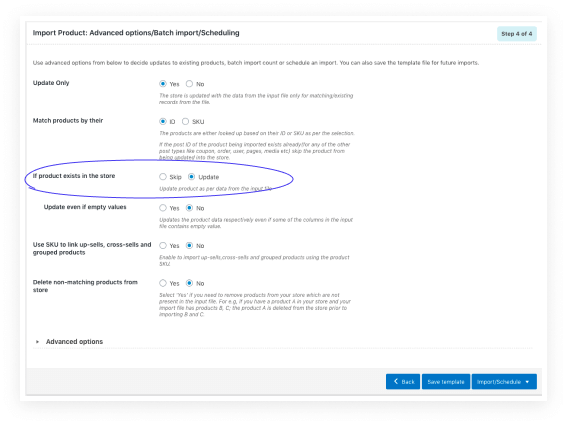
Update or merge data during import
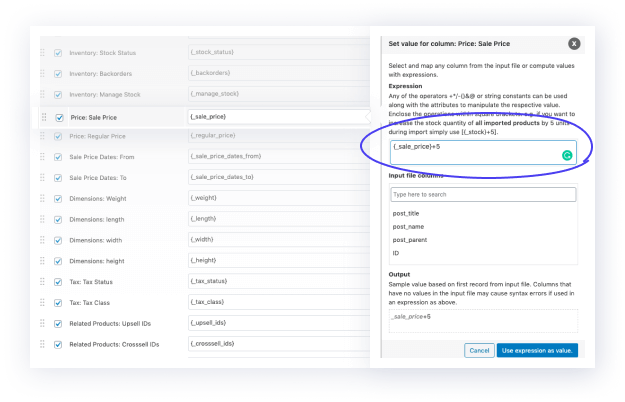
Modify hundreds or thousands of products by applying custom rules during import (For example, increase price by 10%). An Evaluation field is used to modify/update the value of product fields mapped during the import process. Data related to an existing entry in the store can be modified during an import.
You can use the Update Existing Products feature for adding more information to existing WooCommerce products or updating the existing product details. This helps the store owner to update hundreds or thousands of products with new info such as price or sale status.

Support Different File Formats
Export and import data using CSV and XML files
You can import and export data in either CSV files or in XML files. Each post type that can be imported and exported supports both file formats.
100% No-Risk Money Back Guarantee
If you are not 100% happy with our plugin, you can ask for a full refund within 30-day of purchase.
Pricing
This plugin helps you to import and export.
Single Site
- License for 1 site
- 1 year of plugin updates
- 1 year of ticketed support
Upto 5 Sites
- Feature 1
- Feature 2
- Feature 3
Upto 25 Sites
- Feature 1
- Feature 2
- Feature 3
WooCommerce Import Export Suite is an all-in-one bundle of plugins that will enable you to import and export
Single Site
- License for 1 site
- 1 year of plugin updates
- 1 year of ticketed support
Upto 5 Sites
- Feature 1
- Feature 2
- Feature 3
Upto 25 Sites
- Feature 1
- Feature 2
- Feature 3
Frequently Asked Questions
Do you have a question about the ‚Product Import Export Plugin For WooCommerce‘? See the list below for our most frequently asked questions. If your question is not listed here, then please visit the support page.
License
The plugin license comes as a 12 months subscription. The license is valid till one year and will renew after that automatically, unless cancelled. You can use the plugin for lifetime, but support and updates of the plugins will be available as long as the license is active.
The plugin license comes as a 12 months subscription. The license is valid till one year and will renew after that automatically, unless cancelled. You can use the plugin for lifetime, but support and updates of the plugins will be available as long as the license is active.
The plugin license comes as a 12 months subscription. The license is valid till one year and will renew after that automatically, unless cancelled. You can use the plugin for lifetime, but support and updates of the plugins will be available as long as the license is active.
The plugin license comes as a 12 months subscription. The license is valid till one year and will renew after that automatically, unless cancelled. You can use the plugin for lifetime, but support and updates of the plugins will be available as long as the license is active.
The plugin license comes as a 12 months subscription. The license is valid till one year and will renew after that automatically, unless cancelled. You can use the plugin for lifetime, but support and updates of the plugins will be available as long as the license is active.
The plugin license comes as a 12 months subscription. The license is valid till one year and will renew after that automatically, unless cancelled. You can use the plugin for lifetime, but support and updates of the plugins will be available as long as the license is active.
The plugin license comes as a 12 months subscription. The license is valid till one year and will renew after that automatically, unless cancelled. You can use the plugin for lifetime, but support and updates of the plugins will be available as long as the license is active.
General
The plugin license comes as a 12 months subscription. The license is valid till one year and will renew after that automatically, unless cancelled. You can use the plugin for lifetime, but support and updates of the plugins will be available as long as the license is active.
The plugin license comes as a 12 months subscription. The license is valid till one year and will renew after that automatically, unless cancelled. You can use the plugin for lifetime, but support and updates of the plugins will be available as long as the license is active.
The plugin license comes as a 12 months subscription. The license is valid till one year and will renew after that automatically, unless cancelled. You can use the plugin for lifetime, but support and updates of the plugins will be available as long as the license is active.
The plugin license comes as a 12 months subscription. The license is valid till one year and will renew after that automatically, unless cancelled. You can use the plugin for lifetime, but support and updates of the plugins will be available as long as the license is active.
The plugin license comes as a 12 months subscription. The license is valid till one year and will renew after that automatically, unless cancelled. You can use the plugin for lifetime, but support and updates of the plugins will be available as long as the license is active.
The plugin license comes as a 12 months subscription. The license is valid till one year and will renew after that automatically, unless cancelled. You can use the plugin for lifetime, but support and updates of the plugins will be available as long as the license is active.
The plugin license comes as a 12 months subscription. The license is valid till one year and will renew after that automatically, unless cancelled. You can use the plugin for lifetime, but support and updates of the plugins will be available as long as the license is active.
98% of our Customers Rated our Support as ‚Excellent‘
If our extensive documentation doesn’t answer your question, we are just a click away!